
SALES ORDER AUTOMATION
From customer order to ERP sales order in seconds. RIV4 reads orders received by email, attachment or WhatsApp and creates them directly in your ERP — with zero manual data entry and zero rekeying errors.
sales order in your ERP
the order entry phase
quantities and prices
per customer
THE ORDER ARRIVES IN SECONDS.
TYPING IT IN TAKES HOURS.
The customer's order already contains every figure a sales rep is about to retype. Between an email landing in the inbox and that order existing as a confirmed sales order in your ERP, there's a manual step nobody has ever managed to remove.
The same order, typed twice
An order arrives by email, PDF attachment or WhatsApp message. A sales rep opens it, reads it line by line, and re-types customer, items, quantities and prices into the ERP order screen — figures that were already written on the message in front of them.
Codes that don't match — or aren't there at all
Customers order using their own item codes, partial descriptions, or nothing but a product name typed from memory. Someone has to transcode each line by hand and match it against the item catalogue — guessing when the description doesn't quite match anything on the shelf.
One inbox, every format
A structured PDF today, a scanned order form tomorrow, an Excel sheet from one customer, three lines of WhatsApp text from another. There's no fixed layout and no fixed channel — only a sales team reading each one individually before it can become an order.
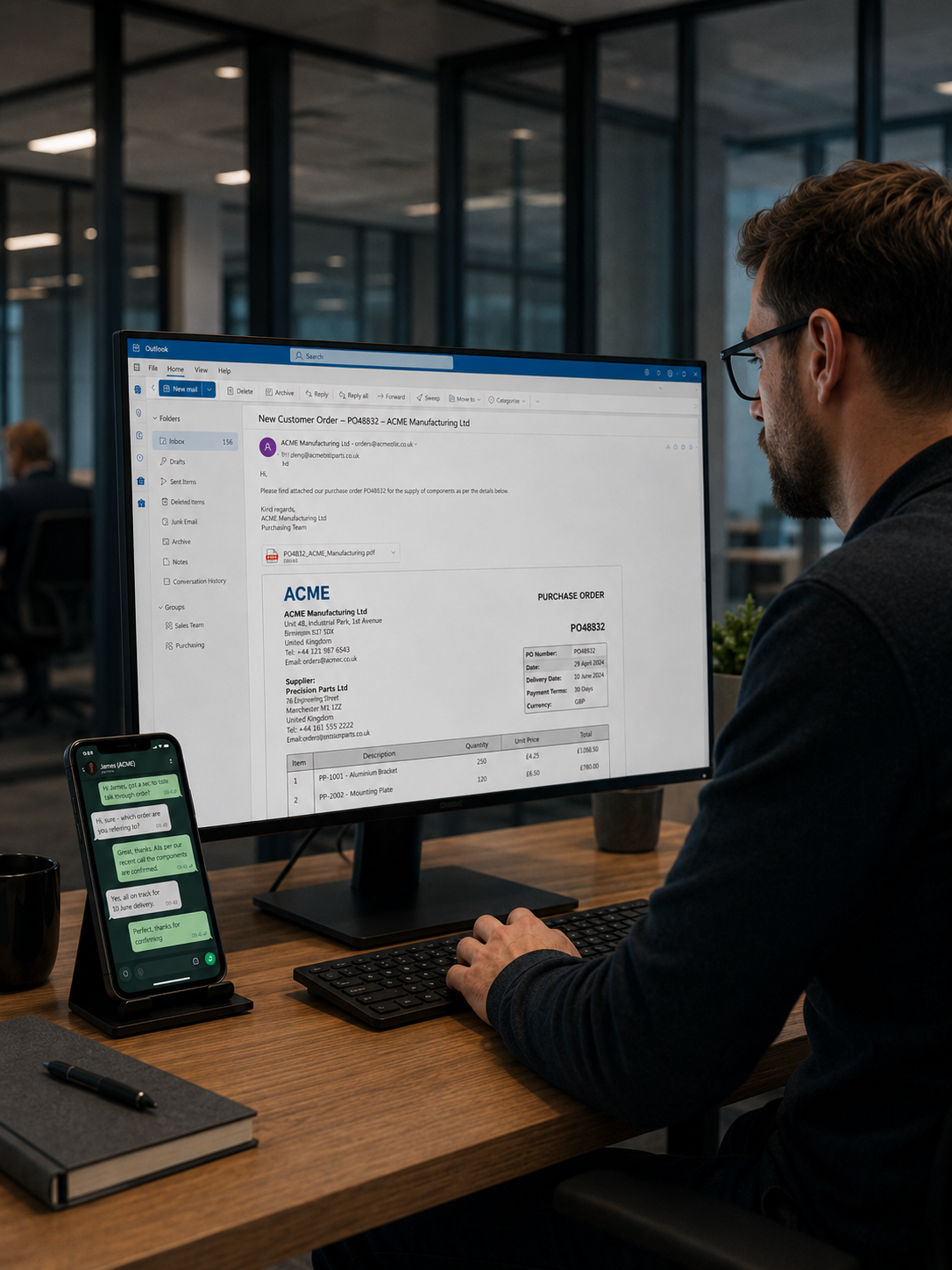
Until the sales order is entered, that revenue isn't in the pipeline — not for planning, not for stock allocation, not for delivery.
THE SOLUTION, STEP BY STEP
RIV4 manages the entire order intake cycle autonomously, involving the sales team only when strictly necessary.

Document & message acquisition
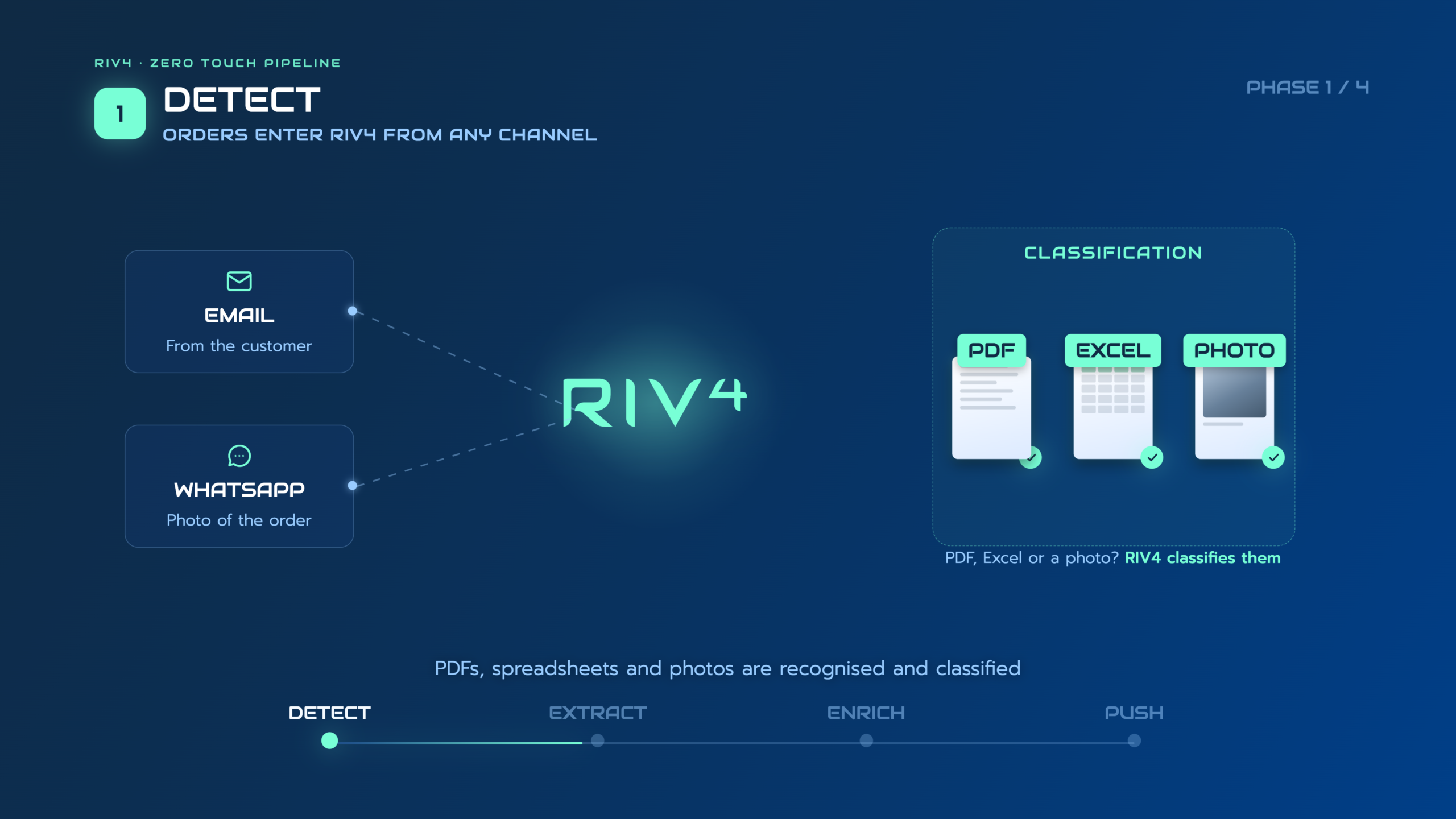
Reads orders wherever they land: email body, PDF or Excel attachment, customer portal, or WhatsApp Business.

Smart parsing
Recognises order content regardless of format — free text, table, scanned form or spreadsheet.

Data extraction
Captures customer, items, quantities, prices, delivery dates and references.

ERP matching
& transcoding
Transcodes customer codes, converts units and checks items against your live catalogue and price list.

Human review
Only exceptions and low-confidence lines are sent to the sales rep.

System update
Validated orders are posted into the ERP as confirmed sales orders in real time.
IN ACTION
From the email landing in the inbox to the sales order posted in your ERP — the whole flow, with no screens skipped.
READING THE ORDER IS EASY.
MATCHING IT ISN'T.
Any email parser can pull text out of a message. The real bottleneck in order entry is knowing which of your items, at what price and in what unit, the customer actually means — when every customer writes orders their own way.
As written by the customer

As your ERP needs it

Customer codes
Every customer uses their own part numbers. RIV4 automatically maps them to the corresponding codes in your ERP for every order line — and remembers new mappings from the orders you confirm.

Mismatched units
Boxes, packs, pallets, single units. RIV4 converts the ordered quantity into the unit your ERP uses, so the line closes instead of opening an exception.

Scored, not guessed
When a customer orders by description alone — or two catalogue items are plausible — RIV4 doesn't pick one at random. It surfaces the alternatives with a confidence score and remembers the sales rep's choice for next time.
The system becomes more accurate with every order it processes, customer by customer.
 WRITES INTO YOUR EXISTING SYSTEM
RIV4 is not an ERP and does not replace yours. It sits in front of your existing system, turning incoming customer orders into clean, validated sales orders and posting them directly into your ERP through native APIs, connectors or middleware. The same integration model is already running with SAP, Microsoft Dynamics 365 Business Central, Zucchetti and TeamSystem.








…and any ERP, Order platform or management system exposing an API or a supported integration layer.
INDUSTRIES SERVED

Trade & Retail
Distributors, wholesalers and resellers processing high volumes of customer orders across email, PDF and WhatsApp, with different formats and product codes.

FMCG & Food
Food and FMCG companies processing high volumes of recurring customer orders where speed, accuracy and fast ERP entry are critical.

Industry & Manufacturing
Manufacturers receiving complex customer orders with multiple lines, technical specifications and customer-specific codes to be converted into ERP sales orders.

Transport & Logistics
Logistics operators and 3PLs receiving transport and service orders from multiple customers across different documents, formats and communication channels.

Technical Distribution
Industrial distributors managing complex catalogues, large customer orders and customer-specific part numbers that must be mapped to internal ERP codes.

Pharma & Healthcare
Pharmaceutical and healthcare suppliers processing customer orders where product codes, quantities and delivery requirements demand maximum accuracy.
WHAT CHANGES IN ORDER ENTRY
Order entry automation produces results that are visible from the first week of operation and measurable against your own baseline.

-75% time
Order entry stops being a bottleneck
The sales team checks orders instead of retyping them. The same team absorbs peak season volumes without temporary hires.

Up to 100% accuracy
Errors caught before confirmation
A wrong item, wrong quantity or wrong price is flagged before the order is confirmed — not weeks later when the wrong goods have already shipped.

Real-time
Revenue in the pipeline the moment it lands
Sales orders are posted on arrival, not batched at day end. Planning, stock allocation and production see real demand instead of yesterday's.
COMPANIES ALREADY AUTOMATING ORDER ENTRY
Different industries, different ERPs, the same problem solved: orders that post themselves.

"Every order that used to take ten minutes to key in now posts itself in under a minute — our team just checks the exceptions."
- Volume
- 50,000 orders/year
- Format
- Email + PDF attachment
- ERP
- SAP

"We stopped losing time and money on manual order entry. Every transport order we receive is now captured accurately and sent straight into our system, exactly as the customer requested."
- Volume
- 50,000 orders/year
- Format
- Email + PDF attachment
- ERP
- Levia Hub

"From incoming emails to orders in our ERP, the entire process is now automated. RIV4 captures each order and automatically schedules the expected delivery dates, saving our team hours of manual work every day."
- Volume
- 10,000 orders/year
- Format
- Email + PDF attachment
- ERP
- Custom
STOP MANUALLY ENTERING SALES ORDERS
Book a demoFAQ
Everything you need to know about sales order automation
Common questions about order entry automation and AI-driven sales order processing with RIV4.
-
Sales order automation uses AI to read a customer order — email text, PDF or Excel attachment, or WhatsApp message — and turn it into a structured, validated sales order in your ERP. Instead of a sales rep opening the system and retyping customer, items and quantities, RIV4 extracts every field, matches it against your catalogue and price list, and posts the order without manual data entry.
-
RIV4 does not rely on a fixed template per customer. It uses document and message understanding models trained to recognise the meaning of a field — customer, item, quantity, delivery date — regardless of whether it's typed in an email, listed in a table, or attached as a PDF or spreadsheet. A new customer's order works from day one, with no template to configure.
-
Yes. RIV4 connects to WhatsApp Business alongside email and reads order messages written as free text — item names, quantities, sometimes without any structure at all — the same way it reads a formal purchase order.
-
Yes. RIV4 checks each line against your live item master and price list, matching by customer code, description or item meaning. If everything lines up, the order is posted automatically. If a line is unclear or doesn't match anything, it's flagged for a quick check instead of being posted blind.
-
RIV4 matches the item by meaning, not by keyword, against your catalogue — the same way an experienced sales rep would recognise what a customer means from a partial description. It learns from every order confirmed, so recurring items are recognised instantly next time.
-
Yes. When a single message carries different delivery addresses, dates or references, RIV4 recognises it and splits the order accordingly, generating a separate sales order for each where your ERP requires it.
-
No. RIV4 is not an ERP or a CRM and does not replace either. It sits in front of the system you already use and feeds it clean, validated sales orders through native APIs, connectors or middleware — the same integration model already running on SAP, Microsoft Dynamics 365 Business Central, Zucchetti, TeamSystem and other management systems.
-
Because RIV4 doesn't require a training set or a per-customer template, most teams go live within a few weeks — the main variable is connecting to your ERP, not teaching the system to read orders.
-
RIV4 never guesses silently. When a match is ambiguous — an unclear item, an unreadable quantity, a code it hasn't seen before — the line is held back and shown to a sales rep with the possible alternatives and a confidence score. Their choice is recorded, so the same case resolves automatically next time.